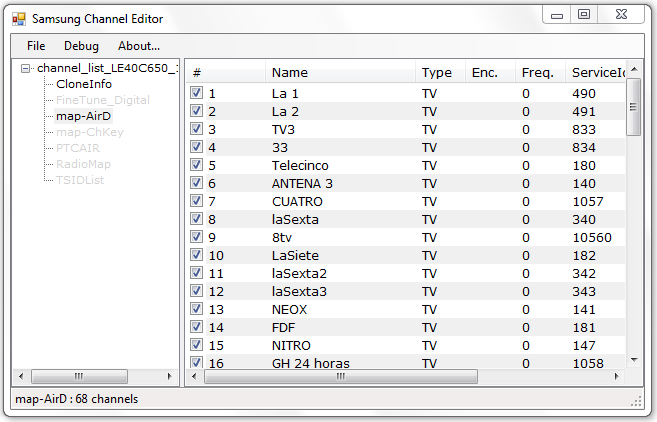
SamsChannelEditor is a desktop application for editing a
channel list from your Samsung TV. Now sorting channels should be much
easier.
 |
- Support Samsung C and D Series.
- Works with scm files directly.
- Support for multiple channels configurations:
- map-AirD
- map-AirA
- map-CableD
- map-CableA
- map-SateD
- map-CDTVVD
- AstraHDPlusD
- Support for configuration files (read-only)
- Easy to use: Just drag & drop channels.
|
Installation
There's no setup file, just download de binaries and execute
the samschanneleditor.exe file. All files are avaiable here.
This application is written in C# so you need the .Net
framework 2.0 (or newer) to be installed on your computer.
You can download here : http://msdn.microsoft.com/en-us/netframework
Source Code
Source code is aviable from Github and SourceForge
Bad file size error
Since version 0.9 you can define new sizes in SamsChannelEditor.exe.config.
Just open with a text editor like notepad and add a new size for your file in section.
key: starts with "fs_" and after comes the channel file name (without "-" after map) value:
is a number list separated by commas. Each number specifies a possible record size.
To calculate your record size:
- change extension .scm to .zip
- Extract all files.
- Select file you are opening and look the size in file properties.
- record size is a 1000 multiple (divide your size by 1000 or 2000)
Example:
<appSettings>
    <add key="fs_default" value="292,320" />
    <add key="fs_mapAirA" value="40,64" />
    <add key="fs_mapCableA" value="40,64" />
    <add key="fs_mapSateD" value="168,172,194" />
    <add key="fs_mapAstraHDPlusD" value="212" />
</appSettings>
Libraries & Resources used
Developers and Collaborators
License
SamsChannelEditor is distributed under the GNU General Public
License (GPL). For more information: GNU GPL.3.0
Changelog
Version 0.11
- Fixed channel names output. Names in Russian output correctly. Other languages must do so
- Channel data edit feature realized. You can edit channel name and favourites.
Version 0.10
- Applied a patch created by Andreas Winter to save sort order to file and restore after.
- Applied a patch created by Andreas Mayer to remove encrypted channels.
Version 0.9
- Moved record sizes to SamsChannelEditor.exe.config. Now are easy to add new record sizes for new models.
Version 0.8
- BUG [3468470] : Open map-SateD 144bytes length (LE37C670)
- MoveTo problems detected when out of range number is introduced.
Version 0.7
- Works on D Series
- Drag and Drop with auto scroll
- Added support for analog channels map-AirA and map-CableA
- Context menu: MoveTo
- Context menu: Renumber All
Version 0.6
- Added support for map-AstraHDPlusD (Astra Satellite Channels)
- Added support for configuration files as read-only
- Added support for SatDataBaseFile.dat (Satellite List)
- Added support for CloneInfo (TV info)
- Modified map-SateD
- Show more channel settings
Version 0.5
- Works on D Series
- Added support for map-SateD (Digital Satellite Channels)
- Added support for map-CableD (Satellite Channels?)
Version 0.4
- Added D Series Compatibility
- Code rewritted
- Only opens smc files
- Added support for editing various files inside scm
- Added support for map-CableD (Digital Cable TV Channels)
- Set channels number on fly
- Solved multiselect problem with checkboxes
Version 0.3
- User can delete channels.
Version 0.2
- Open and Save .scm files directly
- Uses #ziplib
for read and update scm files
Version 0.1
- Tested in C650 series
- Open and Save map_AirD files
- Drag&Drop Channels

